
pfSense: Hierarchical Reverse-Proxy with Caddy
How-To: pfSense

Monday 2nd March 2026
Last week i shared my first impressions and some basic configuration with Termix. If you are interested to set it up yourself, here is how I did it.
Note: This was supposed to be an article about Termix installation. But 90% of the work was related to pfSense configuration so I changed the title and a more specific Termix configuration article will be next.
Preparations
Network Design
In this example we are setting up a service, termix in this case, to be reverse proxied twice; first at the pfSense and then at the Caddy container.
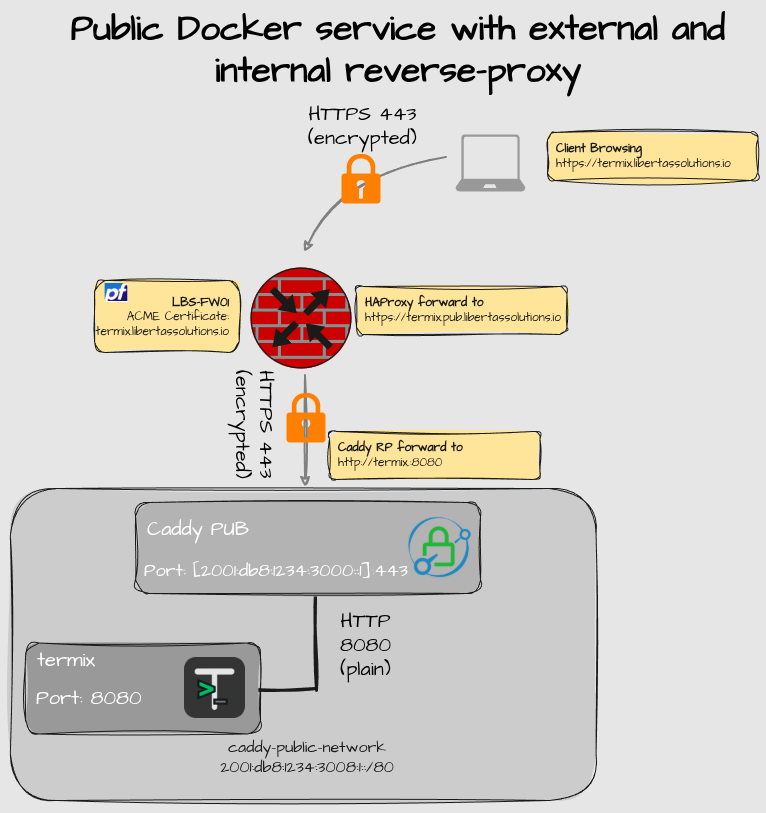
Explanation:
This service was intended to be reachable on the Internet, because I thought it was going to synchronize data between clients, as it branded itself to be an “open source alternative to Termius”. That turned out to be false and I have since removed this configuration. However, imagine any other public service instead.
Regular Reverse-Proxy flow from pfSense firewall is performed as described in earlier articles:
I’m going to try a hierarchical reverse-proxy design, with SSL enabled between the firewall and the docker host. That way nobody between my firewall and server network can intercept any unencrypted traffic. Just in case I have a spy in the basement.
termix by default use plain HTTP and relies on reverse-proxy with the SSL certificate. Optionally you could enable SSL directly on the termix container and skip the caddy reverse proxy.
Firewall Configuration
The preparations for a public service includes:
Check that the internal certificates CA is added to the trusted authorities
HA Proxy
Most of the configuration of those services are nothing out of the ordinary but I include some summary picture here for documentation purpose. I’m using a pfSense firewall but the general concepts should be the same for other appliances.
Dynamic DNS entries

ACME Certificate

DNS Resolver entry
Add this to Host Overrides. This configuration adds a static entry in the /etc/hosts file:

Note: This is actually not required, as you have to manually enter SNI information in the HAProxy Backend anyway. But it’s nice to have for documentation.
Add CA to trusted store
Under System > Certificates > Authorities you can add custom authorities. Remember to check “Add this Certificate Authority to the Operating System Trust Store”
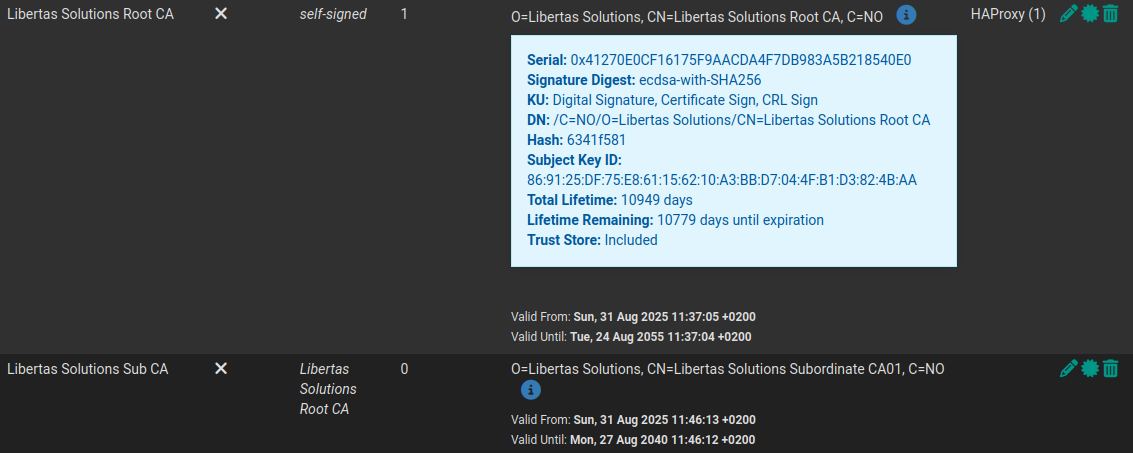
Important: If you are on the latest stable version of pfSense (25.11.1), there is a bug that makes the certificates not available in the trust store even after adding them through the GUI. To fix this problem, read this article:
https://open.substack.com/pub/opensourceisfun/p/pfsense-troubleshooting-certificate
HAProxy Configuration.
HTTPS Backend
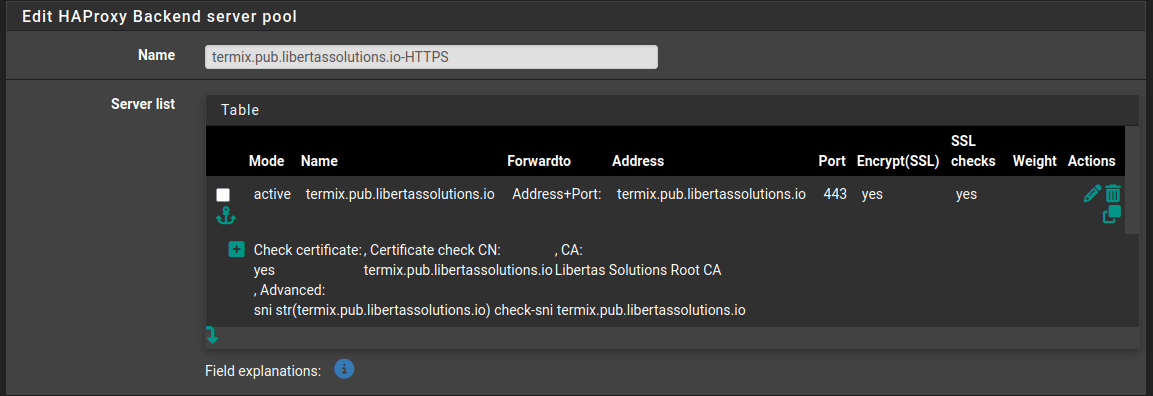
The HTTPS Backend requires some additional advanced settings for hierarchical RP to work:
Name: termix.pub.libertassolutions.io-HTTPS
Server list:
Mode: Active
Name: termix.pub.libertassolutions.io
Forwardto: Address+Port
Address: termix.pub.libertassolutions.io
Port: 443
Encryption: Yes
SSL Check: Yes
Advanced:
Check Certificate: Yes
Certificate Check CN: termix.pub.libertassolutions.io
CA: Libertas Solutions Root CA (It has to be the Root)
Advanced: sni str(termix.pub.libertassolutions.io) check-sni termix.pub.libertassolutions.io
Health check: none
Advanced Settings:
Backend pass thru:
http-request set-header Host termix.pub.libertassolutions.io

Explanation:
Because Caddy expects SNI information but HAProxy only forwards towards the IP by default, some advanced configuration like
sni strandhttp-request set-header Hostis necessary.When SSL is enabled you also need to specify which CN you are verifying against.
Even if you configure the backend with DNS, inside the HAProxy configuration file, it converts to an IP address. You can verify the configration by inspecting
/var/etc/haproxy/haproxy.cfg
/root: cat /var/etc/haproxy/haproxy.cfg
...
backend termix.pub.libertassolutions.io-HTTPS_ipvANY
        mode                    http
        id                      104
        log                     global
        timeout connect         30000
        timeout server          30000
        retries                 3
        load-server-state-from-file     global
        http-request set-header Host termix.pub.libertassolutions.io
        server                  termix.pub.libertassolutions.io 2001:db8:1234:3110::1:443 id 118 ssl check-ssl  ca-file /var/etc/haproxy/ca_69943e22074da.pem verifyhost termix.pub.libertassolutions.io sni str(termix.pub.libertassolutions.io) check-sni termix.pub.libertassolutions.io
HTTPS Frontend
HTTPS Frontend configuration is nothing out of the ordinary. Add an ACL entry and a condition for traffic destined to termix.domain.tld.
Access Control Lists:
ACL entries for the HTTPS Backends:
Name: termix.libertassolutions.io
Expression: host matches
CS: No
Not: No
Value: termix.libertassolutions.io

Actions:
Action: Use Backend
Paremeters: Use Backend
Backend: termix.pub.libertassolutions.io-HTTPS
Conditions ACL Names: termix.libertassolutions.io

Under “SSL Offloading”, add the ACME certificate under “Additional Certificates”

Caddy Configuration
Caddy configuration is nothing out of the ordinary. Here is my entry in the Caddyfile:
# Termix:
termix.pub.libertassolutions.io {
        reverse_proxy termix:8080
        tls /etc/caddy/certs/termix.pem /etc/caddy/certs/termix.key
}
Verification
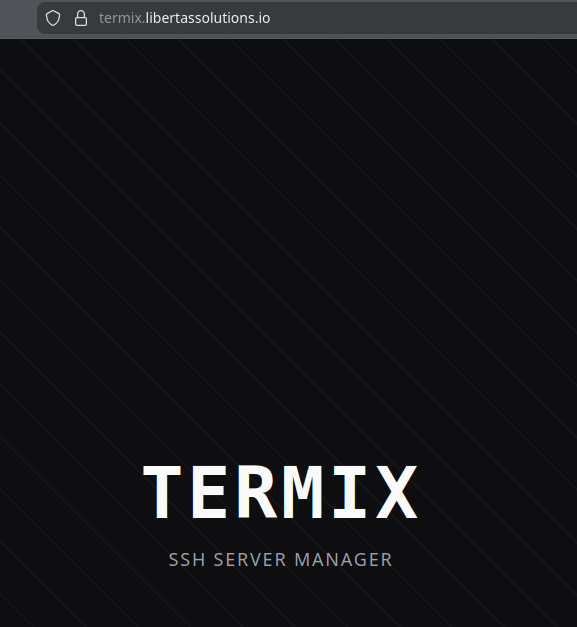
Now go to the service DNS name and verify that it is reachable:
Conclusion
I expected this project to not take this long but I learnt a lot of new things about reverse-proxying so it was worth it. I believe more articles will spawn thanks to termix. For instance, I really want to enable SSO with keycloak in the future.
Special Mention
I want to thank Leo again for helping me figure out all the issues I had with SSL verification and oither advanced reverse-proxy configuration.