
pfSense: Configure Reverse Proxy for Nextcloud - 2025 edition
How-To: Pfsense, HAProxy

Monday 15th December 2025
Back in 2023 I posted my original edition of this article. However, with time comes some new realizations and there was actually a few mistakes made back than. Actually so many that instead of updating the old article, I decided to write a completely new version based on my newfound knowledge.
Design
This is the design I intend to setup:
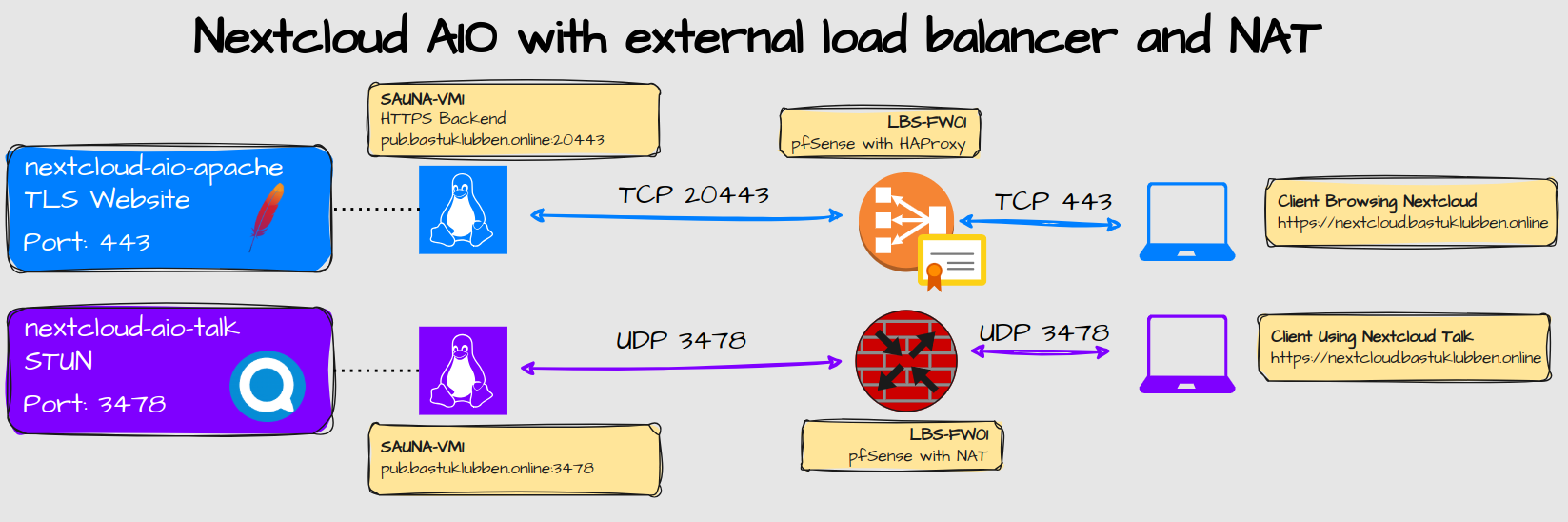
Explanation:
I’m using Nextcloud AIO, which is the recommended way of running Nextcloud and included services.
The HTTPS traffic destined to nextcloud.bastuklubben.online is forwarded to pub.bastuklubben.online:20443
The pfSense has the TLS certificate for nextcloud.bastuklubben.online. Traffic between pfSense and SAUNA-VM1 is unencrypted.
STUN traffic on UDP 3478 is port forwarded (NAT) through the firewall. Both IPv4 and IPv6 traffic is being forwarded.
Reverse-Proxy vs. NAT for Nextcloud Talk
In the previous article from 2023 I had a separate frontend/backend for Nextcloud Talk. Back then I used an external High-Performance Backend server where STUN traffic was listening on TCP 5349. That server has been decommissioned because the Nextcloud Talk container is a lot easier to setup and more stable.
I think HAProxy is able to proxy UDP traffic but there is no option for that in the pfSense plugin. Therefore I’m using NAT Port forwarding instead. The end result is the same anyway.
However, there is the that limitation that I cannot reuse port 3478 if I have multiple Nextcloud talk containers sharing the same external IP. If that becomes a problem, I can install a standalone Nextcloud Talk container that can be used by multiple Nextcloud domains.
Pre-Requisites
This guide builds on the concept derived from this post:

The setup for Nextcloud HTTPS proxy is almost identical to the one described in that article. What differs is that you don’t need any HTTP backend, unless you want to enable HTTP redirect to HTTPS. There is no need for ACME-Challenge because the Nextcloud AIO mastercontainer knows that it is behind a proxy and will therefore communicate with the RP unencrypted and rely on pfSense to encrypt traffic to the end-user.
Configuration
I’ll only summarize topics that already I already covered in previous articles.
Dynamic DNS entries

Details on how to configure this varies depending on the domain provider. I have written one example on how to do it with EasyDNS, which I recommend.
Let’s Encrypt Certificates with ACME plugin

Details about how to configure ACME account keys are still relevant in the old article.
HAProxy Settings
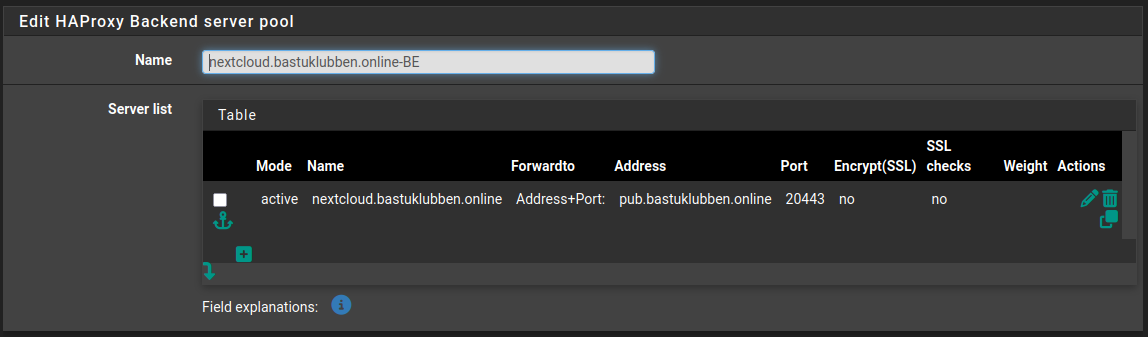
Backend Settings
Name: nextcloud.bastuklubben.online-BE
Server list:
Mode: Active
Name: nextcloud.bastuklubben.online
Forwardto: Address+Port
Address: pub.bastuklubben.online
Port: 20443
No SSL checks, encryption, weight or actions defined
Health check: none
Frontend Settings
The Frontend is the same as in Website Hosting Part 1, with the addition of some new ACL entries and actions.
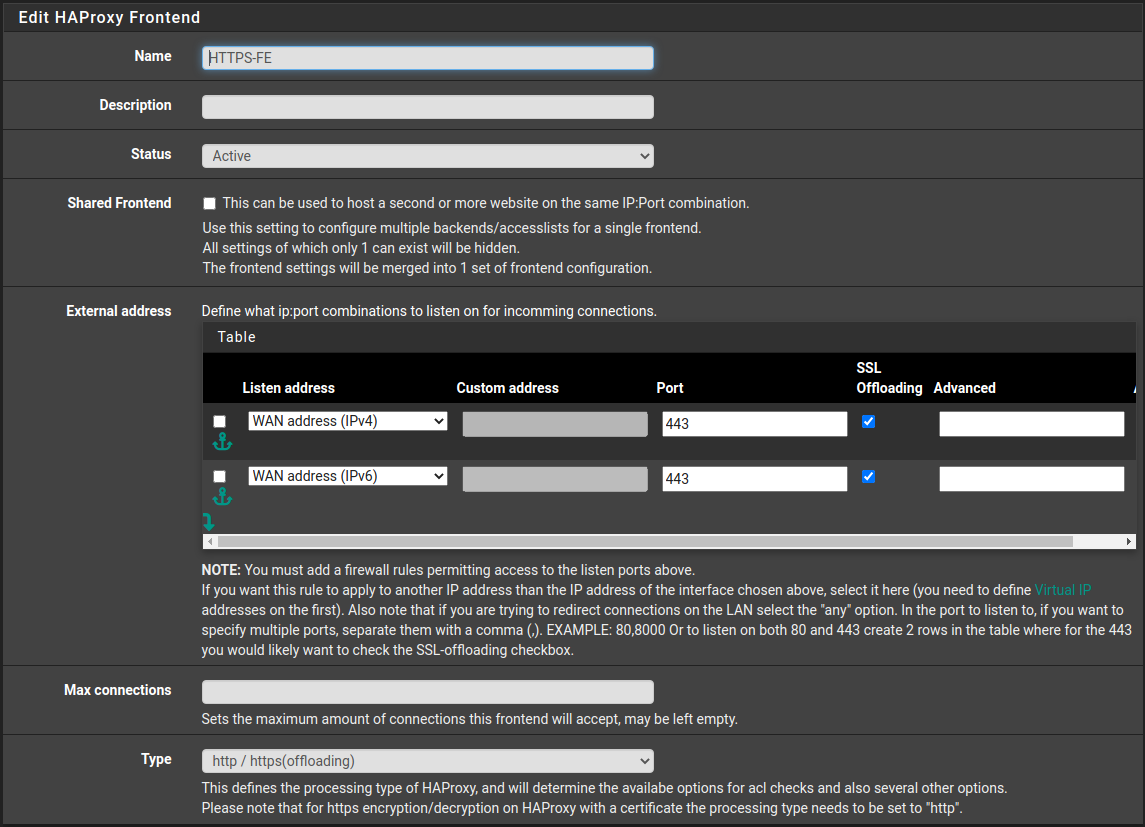
Settings under “Edit HAProxy Frontend” are the same:
Name: HTTPS-FE
Status: Active
External Address:
Listen Address: WAN IPv4. Port: 443. SSL Offloading: Yes
Listen Address: WAN IPv6. Port: 443. SSL Offloading: Yes
Type: http / https (offloading)
Settings under “Default backend, access control lists and actions”:
Access Control Lists:
Name: nextcloud.bastuklubben.online
Expression: host matches
CS: No
Not: No
Value: nextcloud.bastuklubben.online
Name: caldav-endpoint
Expression: path starts with
CS: No
Not: No
Value: /.well-known/caldav
Name: carddav-endpoint
Expression: path starts with
CS: No
Not: No
Value: /.well-known/carddav
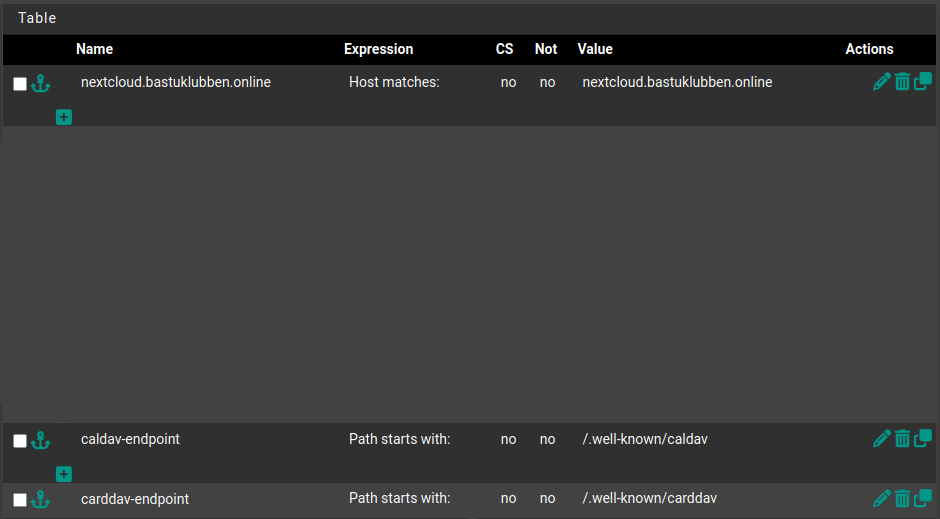
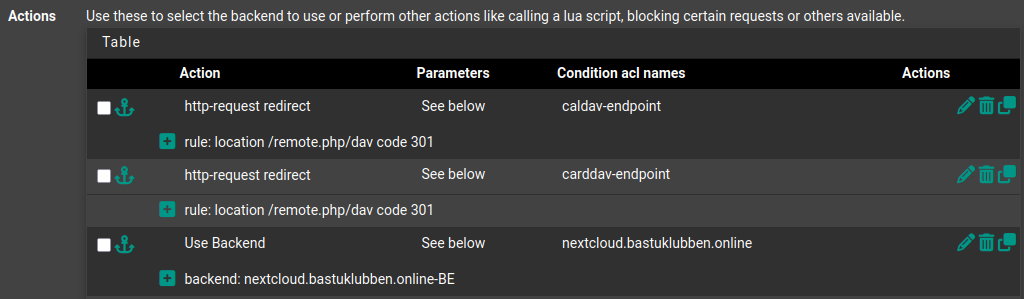
The caldav and carddav endpoints are used to sync calendar and contact information. The URL needs to be redirected to /remote.php/dav.
Notice that the order of these rules matters as HAProxy reads them sequentially:
Actions:
Action: http-request redirect
Parameters:
Rule: location /removte.php/dave code 301
Condition ACL Names: caldav-endpoint
Action: http-request redirect
Parameters:
Rule: location /removte.php/dave code 301
Condition ACL Names: carddav-endpoint
Action: Use Backend
Paremeters: Use Backend
Backend: nextcloud.bastuklubben.online-BE
Conditions ACL Names: nextcloud.bastuklubben.online
Under “Advanced Settings”:
Check the Use “forwardfor” option. This makes the nextcloud server know from which client the request was forwarded for.

Under “SSL Offloading”:
Certificate: Use any certificate available. Check “Add ACL for certificate SANs”
Additional Certificates:
add certificates for nextcloud.yourdomain.tld.
Check “Add ACL for certificate SANs”
Note: HAProxy will present correct certificate to the client based on the information inside the SNI=Server Name Indication.
NAT Rules
Port forwarding for UDP 3478 is needed for Nextcloud Talk to function.
Navigate to Firewall > NAT. Creating a NAT rule is pretty self explanatory and it works for both IPv4 and IPv6.
The one thing you need to remember is to use NAT Reflection: Pure NAT. Otherwise Nextcloud Talk won’t work for internal clients and the Nextcloud container and the Talk container won’t be able to communicate correctly.

Now you can go ahead and install your Nextcloud AIO instance.
Awesome guide! The decision to handle UDP traffic via NAT instead of HAProxy makes total sense given pfSense's plugin limitations. I ran into similiar issues trying to proxy STUN traffic last year and ended up with the same workaround. One thing worth mentioning is that Pure NAT reflection can get a litle tricky with certain router hardware, but it's defintely the right approach for keeping internal Talk sessions stable.