
Webbrowser tracking
How-To: Firefox and Brave

Monday 11th May 2026,
I read this article from Logos about how the Browser leaks software and hardware information about your PC. The Browser gives away, among others, following information without your consent:
Screen Resolution
Graphic Card
Amount of CPU cores
Operating system
Browser used
Timezone
Amount of memory
None of this information can be considered personal data, because it could be thousands of identical hardware configurations, but when combined, someone could identify your machine with 99% accuracy, even if you switch browser on the same machine. That was an eye opener to me when I realized how much data is being sent just by opening a website.
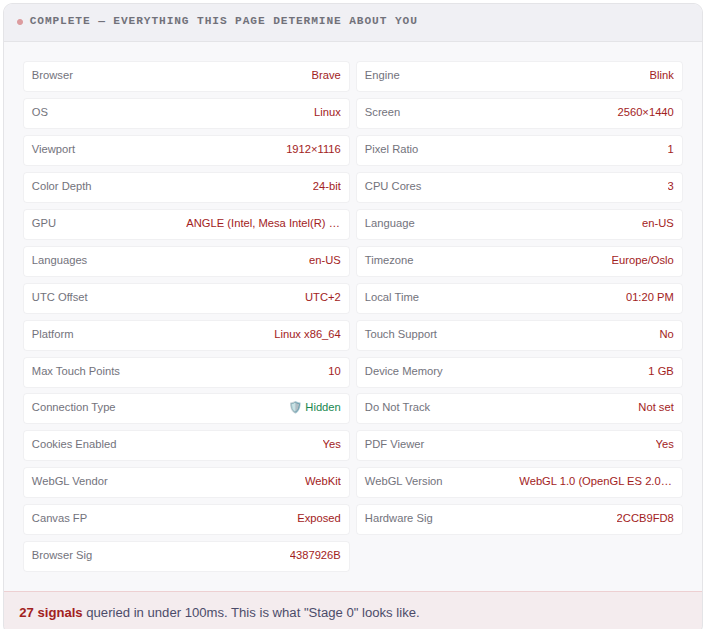
However, I’m using Brave as the main browser and I found out that it actually sends fake information to the webserver; the Device Memory and CPU cores are incorrect. I also noticed that the hardware Sig changes when I connect to my docking station.
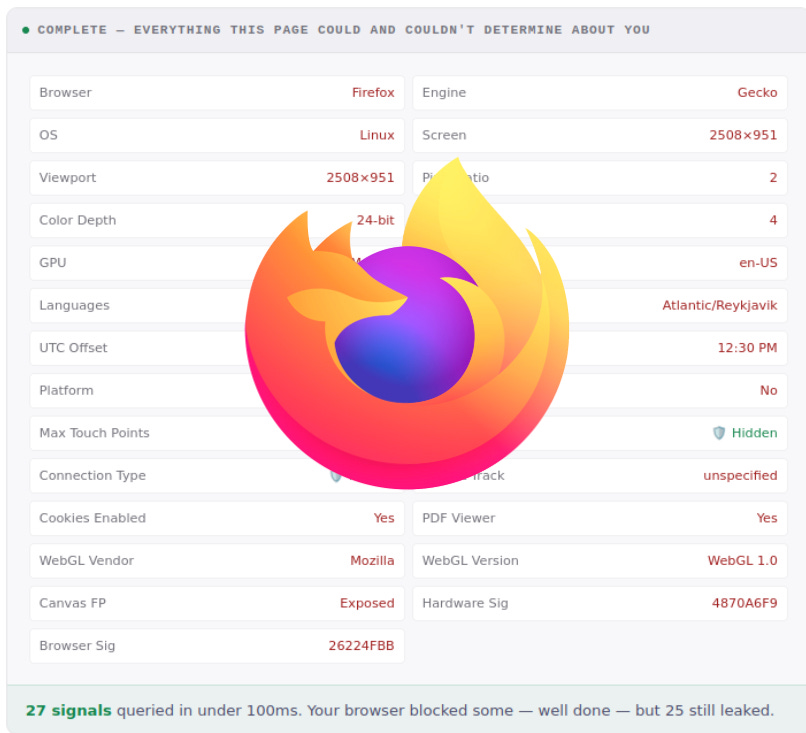
On Firefox however, the hardware signatures are accurate. When you enable “privacy.resistFingerprinting = True” in the Configuration Editor (about:config), it also fakes the data, even better than Brave:
I can just imagine how much data you would leak if you were using edge, where your Microsoft account gets tied to your device.
Testing and tweaking
Another Firefox feature recommended to tweak is to set Enhanced Tracking Protection to Strict under Privacy & Security Settings. (Uncheck “Fix Major Site Issues” as long as you don’t experience any browsing problems).
I also enabled “Do not track” in both Firefox and Brave, but that feature seems futile as it only tells sites to “please do not track and sell my data” and is probably ignored in most cases.
While faking the hardware information is better than nothing, for trackers it’s irrelevant as long as they are consistent. fingerprint.com recognizes my machine even after clearing cookies and changing IP.
This became a game for me to find and enable every privacy feature in Brave and Firefox to avoid being re-identified. Alas, even with Brave Private Tor window, my machine was still re-identified. I thought this could be because I’m using the same IPv4 address in my testing, but no. On my phone connected to WiFi, fingerprint.com recognized it as another device.
I did eventually manage to not be re-identified with the Firefox browser using a new profile with every privacy setting turned on:
Enhanced Tracking Protection = Strict
privacy.fingerprintingProtection = True
Do Not Track = True
Clear Browsing History every time I close the window = True
Incognito Mode: Always on.
DNS over HTTPS
However, when I tried again later, it managed to re-identify me anyway. So it seems a bit random if you are going to be identified or not.
I also tested re-visiting fingerprint.com over a period of three weeks. Sometimes it was able to re-identify me but then I had an internet glitch and got a new public IP. Then I wasn’t re-identified with Brave or Firefox. So it is possible to avoid re-identification but it is a big hassle.
Note that another tool by EFF called Cover Your Tracks says that Braves ID appears to be randomized while Firefox is unique. This may suggest that Braves generated hardware information may overlap with other visitors, therefore making it harder to identify a user. However, the timezone and GPU are still not randomized with Brave. Therefore one type of test alone is not adequate to say which privacy browser is the better one.
Todays Internet is hostile to privacy by design
While using a privacy-friendly browser reduces some tracking, it can only do so much. The core problem is that the underlying infrastructure is hostile to privacy and therefore it’s currently near impossible to be completely anonymous online. However, at least you can reduce the amount of tracking by following some advice laid in the article by Logos.
It’s an alarming discovery that there is currently so little you can do about this type of tracking. On the bright side though, there are people currently working on solutions which will re-shape the way we browse the Internet for the better in the hopefully not too distant future. Logos is one of them and Arcium is another.
Sources
This article was inspired by following sources: